By Bobby Stevens
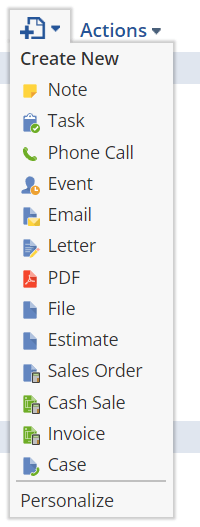
The NetSuite Actions menu provides convenient access to standard record operations. But, when you need to tailor workflows or enforce custom business logic, you might want to take control of this menu. Imagine you’ve introduced a “Create Sales Order” button with built-in validation – you wouldn’t want users accidentally using the standard action and bypassing your rules.
Let’s dive into a couple of handy client-side functions to customize the Actions menu:
1. Renaming Actions
JavaScript
function renameAction(actId, newName) {
  const actionRows = document.querySelectorAll("table.ac_table tr");

  for (const row of actionRows) {
    const actionNameCell = row.querySelector('td:first-child div span');

    if (actionNameCell) {
      const actionId = actionNameCell.textContent.toLowerCase().replace(/\s/g, "");

      if (actId === actionId) {
        actionNameCell.textContent = newName;
        break; // Exit loop once found
      }
    }
  }
}
Explanation:
- Parameters: This function takes
actId(the original action’s ID, e.g., “salesorder”) andnewName(what you want to rename it to). - Logic: It finds the action within the menu table and updates its text.
Example Usage:
JavaScript
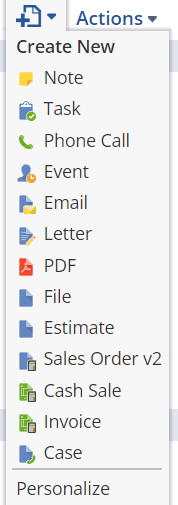
renameAction('salesorder', 'Sales Order v2');
2. Hiding Actions
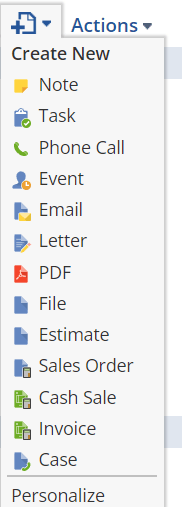
Sometimes, you want to completely remove actions from the menu to simplify the user interface or enforce specific workflows. Here’s a function for that:
function hideAction(actId) {
  const actionRows = document.querySelectorAll("table.ac_table tr");

  for (const row of actionRows) {
    const actionNameCell = row.querySelector('td:first-child div span');

    if (actionNameCell) {
      const actionId = actionNameCell.textContent.toLowerCase().replace(/\s/g, "");

      if (actId === actionId) {
        actionNameCell.parentElement.style.display = 'none'; // Hide the entire row
        break;
      }
    }
  }
}
Explanation:
- Parameter: This function takes the
actIdof the action you want to hide. - Logic:
- It locates the correct action within the menu table.
- Instead of just changing the text, it hides the action’s entire table row by setting
display: none.
Example Usage:
JavaScript
hideAction('salesorder'); // Hides the standard 'Sales Order' action
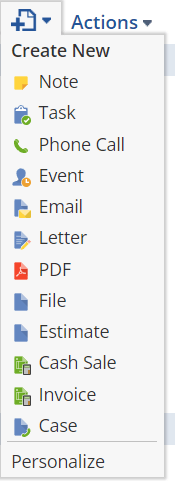
Let’s explore other idea’s we could employ on manipulating the actions menu with client-side scripting:
Rearranging Actions:
- Prioritizing Actions: You could dynamically reorder actions based on user roles or context. For example, a sales manager might see “Close Opportunity” at the top of their menu, while a support rep might have “Create Case” prioritized.
- Implementation: This would involve manipulating the DOM (Document Object Model) to reposition the table rows representing actions. You’d need careful JavaScript to insert rows at specific positions within the table.
Adding Actions:
- Custom Buttons: You could inject entirely new action buttons into the menu. These could trigger custom SuiteScripts, external integrations, or other tailored functionality.
- Implementation: This would require constructing new table rows and cells, along with the logic to handle the button clicks.
Role-Based Customization
- Tailored Workflows: Adapt the Actions menu to specific user roles by rearranging, adding, or removing actions. This streamlines their experience and focuses them on the most relevant tasks.
- Implementation: You’d likely use NetSuite’s role information (e.g.,
nlapiGetRole()) to determine which actions to display and in what order.
Considerations:
- Complexity: More advanced manipulation increases development complexity. Consider the trade-off between customization and ease of maintenance.
- NetSuite Updates: Be mindful that NetSuite updates could change the underlying structure of the Actions menu, potentially requiring you to adjust your custom code.
The Power of Customization
By thoughtfully rearranging, adding, and tailoring actions based on user roles, you can transform the NetSuite actions menu into a powerful tool that optimizes workflows and enhances the user experience. The possibilities are indeed endless!
Need Help? Let’s Connect!
I’m a certified NetSuite developer dedicated to making NetSuite work seamlessly for businesses. If you have any NetSuite development requirements, I’d be delighted to assist! Please feel free to reach out.
Thank you for your response. ✨

- AI for Business: Beyond the Buzz
- Clearing Up NetSuite Misconceptions: Async vs. Map/Reduce
- Converting NetSuite Reports to CSV: Strategies for NetSuite Developers
- DOM Manipulation: The NetSuite Developer’s (Sometimes) Secret Weapon
- Dynamic Saved Searches in NetSuite: No Suitelets or Multiple Searches Needed
- Dynamically Hide Field Groups in NetSuite with Client-Side Scripts
- NetSuite Developers: The Good, The Bad, and The Notepad-Loving
- NetSuite Solutions: It Takes a Village (of Scripts)
- Streamline Your NetSuite Advanced PDF Templates with External Freemarker Files
- Understanding NetSuite User Event Entry Points: BeforeSubmit vs. afterSubmit
- Unlocking Efficiency with Async Functions in NetSuite Server-Side SuiteScript
- Why Your NetSuite Scripts Should Play Nicely: The Importance of Pre-Customization Analysis
 Logic Raid